Fun Print App for
Mini Thermal Printers
Use the Fun Print photo printing app to connect a compatible mini thermal printer over Bluetooth, then print phone photos, notes, labels, stickers, and documents.
 Alternative download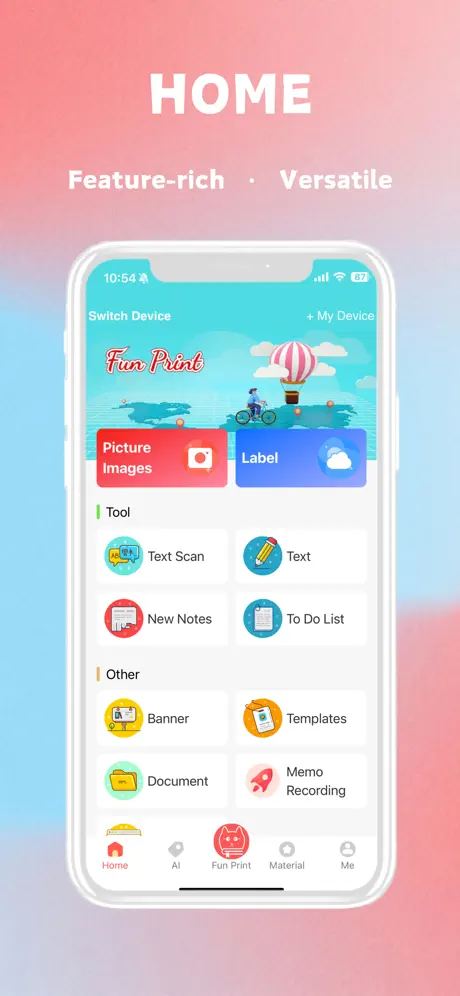
One app for everyday
mini-printer projects
Fun Print Mini Printer Compatibility
Find model-specific setup and paper guidance for mini printers used with Fun Print.
C15 Mini Printer - Complete Setup and Usage Guide
Set up the C15 mini printer with FunPrint, load thermal paper, connect over Bluetooth, make the first print, use key controls, and follow charging and maintenance guidance.
C17 Mini Sticker Printer - Setup and Usage Guide
Set up the C17 Bluetooth pocket printer with FunPrint, load label or sticker paper, connect from the app, adjust print settings, and resolve common operating problems.
C20 Mini Thermal Photo Printer - Setup and Usage Guide
Set up the C20 mini thermal photo printer with FunPrint, load compatible paper, pair over Bluetooth, print photos or labels, and handle common charging and print issues.
C23 Mini Printer - Setup and Usage Guide
Set up the C23 wireless thermal printer with FunPrint, install paper, connect inside the app, print photos and stickers, and troubleshoot common pairing or output problems.
C9 Pocket Printer - Setup and Usage Guide
Set up the C9 pocket printer with FunPrint, charge the device, load thermal paper, connect through the app, make a first print, and solve common Bluetooth or print issues.
FunPrint Portable Mini Printer Setup Guide
Set up and use the CYEELVES S09XME533X portable mini printer, including charging, thermal paper installation, FunPrint connection, basic printing, safety, and maintenance.
What you can print with Fun Print
Turn everyday content on your phone into compact thermal prints.
Print photos from your phone
Select a phone photo, crop it for the paper width, review the black-and-white preview, and print.
Text, memos, and lists
Create quick notes, labels, to-do lists, banners, and other text-based prints inside the app.
Documents and web pages
Open supported documents or web content in Fun Print, adjust the text size, and prepare it for thermal printing.
Bluetooth printer connection
Find a compatible mini printer in the app and connect before sending your first print job.
Your first print
Start printing in three clear steps
Install Fun Print from a verified source, connect a compatible mini printer inside the app, then preview the job before it reaches the paper.
Read the complete setup guide- 01
Install
Choose a verified download
Use the Apple App Store or Google Play when available. Pgyer remains clearly labeled as an alternative source.
Choose a download - 02
Connect
Pair inside Fun Print
Power on the printer, grant the Bluetooth access requested by your phone, and select the compatible device from Fun Print.
View the setup guide - 03
Print
Choose, preview, and print
Prepare a photo, note, label, or document and check the black-and-white preview, crop, and density before printing.
Learn photo printing
Connected, but nothing prints?
Follow the checks in order before reconnecting repeatedly.
Helpful Tutorials
Master your printing experience with our guides.
Document Printing Guide
Learn how to import, format, preview, and print text or documents with FunPrint while choosing readable font sizes, margins, orientation, and print density.
Getting Started - First Time Using FunPrint
Install FunPrint from a verified source, prepare a compatible mini printer, allow Bluetooth access, connect inside the app, load thermal paper, and complete your first print.
Fun Print Connected but Not Printing? Troubleshooting
Fix a Fun Print mini printer that connects but will not print, cannot be found, stops mid-job, produces blank or faint output, crops photos, or fails to feed thermal paper.
One-stop creative hub
Your all-in-one solution for effortless printing and creative management.
Made for portable thermal printing
A practical workflow for small, ink-free printers used at home, school, and on the go.
Easy printing
Prepare common print jobs from one mobile app without a desktop computer.
Ink-free output
Compatible thermal printers use heat-sensitive paper instead of ink cartridges.
Multiple paper types
Use standard thermal rolls or compatible adhesive paper for notes, labels, and stickers.
Setup help
Follow model-specific manuals and troubleshooting guides when pairing or printing does not work.
Common Fun Print questions
Quick answers for downloading, compatibility, and connection problems.
Where should I download Fun Print?
Use the App Store on iPhone or iPad and Google Play on Android. An alternative Pgyer download is also available.
View download options →Is my printer compatible?
Compatibility depends on the printer model. Check the model name on the device, packaging, or manual before pairing.
Browse printer guides →Why will my printer not connect?
Confirm the printer is powered on, Bluetooth is enabled, and the app has the permissions required by your phone.
Open troubleshooting →Can I turn a phone photo into a sticker?
Yes, when the printer supports self-adhesive thermal paper. The physical result is normally black and white.
Read the sticker guide →Ready to start printing?
Choose your device platform, install Fun Print, and follow our setup guides for your compatible mini printer.
Alternative download via Pgyer ↗